Resources · Guide
Connect an stdio MCP server
Meandr supports stdio MCP servers — the ones that run as a process on your own machine instead of sitting at a URL. The Meandr CLI dials out from your side, and the server lands in your dashboard ready for any of your agents.
A server from the Docker MCP catalog or the Official MCP registry doesn't need a machine of yours: it can run on a Meandr machine instead.
Three steps
From a local process to curated tools
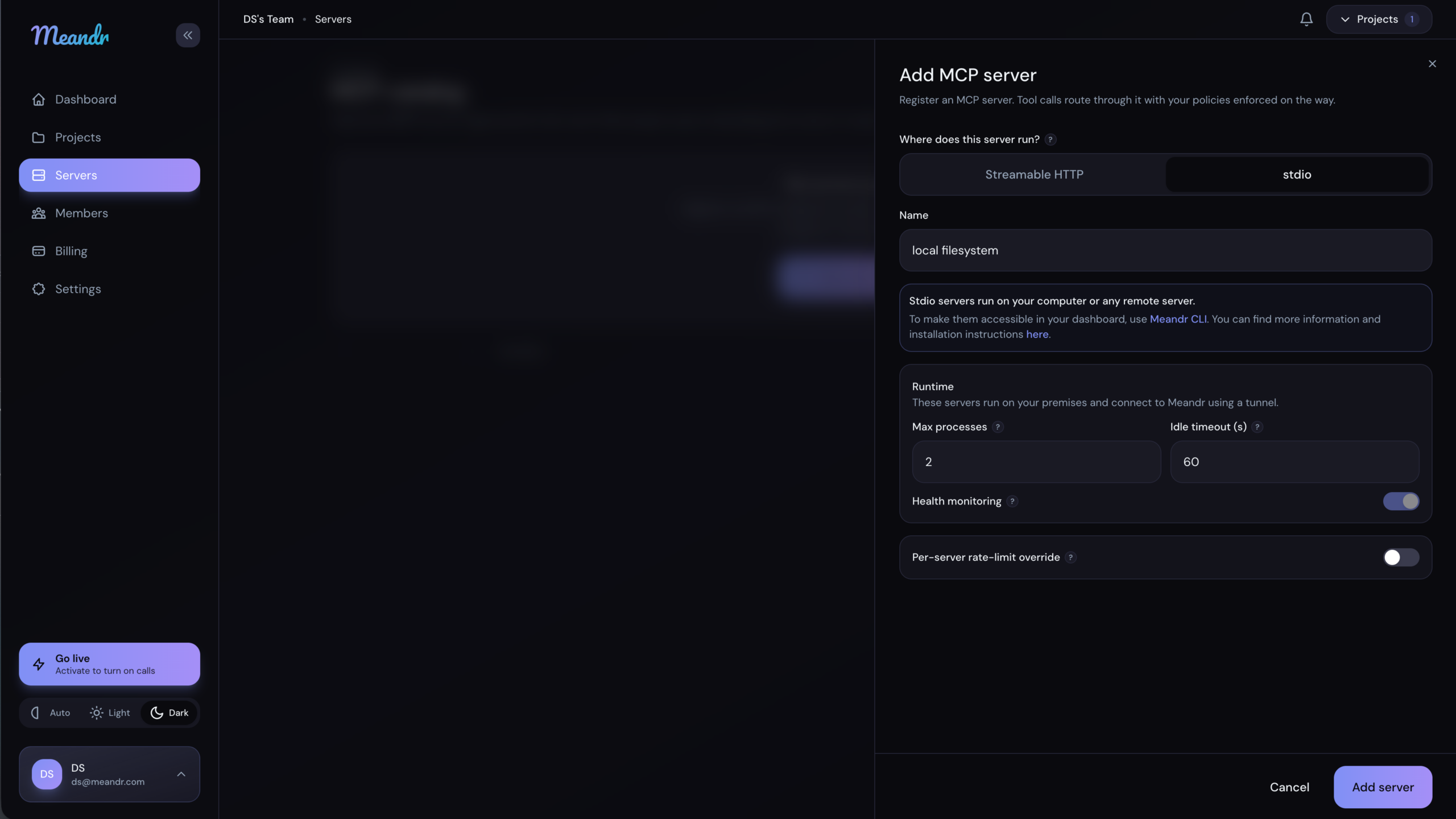
Create the server
Pick stdio.
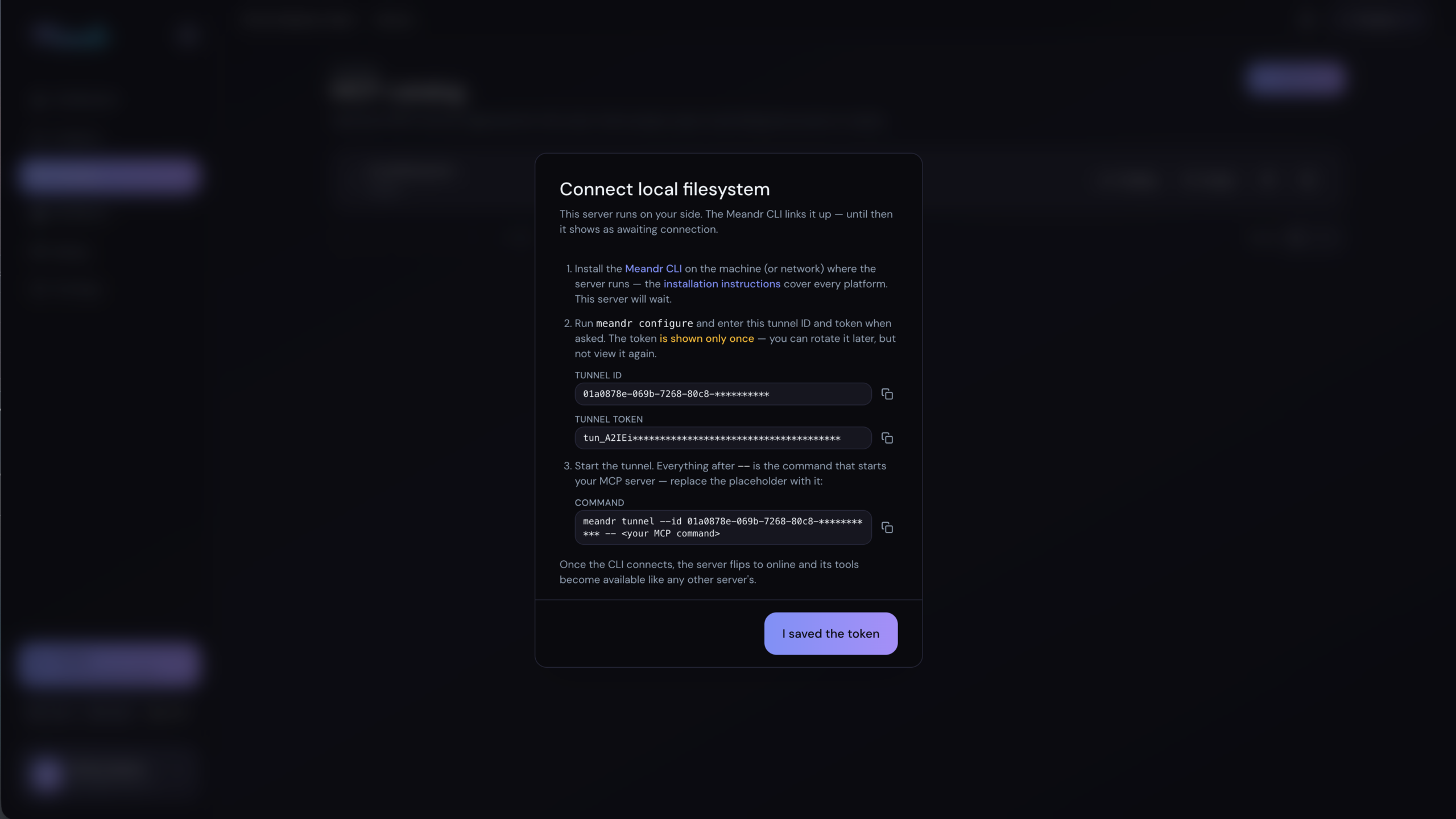
Add a server and choose stdio as the transport. There is no URL to enter and no credential to store — Meandr never signs in to a server it does not reach. You get a tunnel token, shown once, so copy it before you close the dialog.
Run the CLI beside it
One command.
Install the Meandr CLI on the machine that runs your server, give it the token, and start the tunnel with your own command after the dashes. The CLI launches your server, dials out to Meandr, and holds the connection open.
Curate
Pick the tools.
The moment it connects, the catalog fills with everything the server exposes — each with a switch. Then a workspace picks which of those tools it can call. Two gates, the same as any other server.
The command that connects it
Everything after the two dashes is your own server — the CLI runs it exactly as you would.
export MEANDR_AUTH_TOKEN="<the token from step 1>"

meandr tunnel --id <tunnel-id> -- npx -y @modelcontextprotocol/server-everything
Swap the last part for whatever starts your server. The token authenticates the CLI, not your server: it is stripped from the environment before your process starts, so your server never inherits it.
Installing the CLI: one command, on the machine that runs your server. Install instructions
Node.js servers: commands that start with npx -y need Node.js 18 or newer on that machine.
What is different from a server at a URL
Three things surprise people the first time. None of them is a fault.
You set it up before it connects
Rate limits, policies and workspace assignment are all yours to set while the server still says awaiting connection. Every other server has to be reachable before it is saved; this one does not.
The catalog is empty until it does
Meandr cannot ask a server what it offers before there is a connection, so the tool list stays blank at first. It fills in as soon as the CLI dials in.
Going offline is normal
Close your laptop, restart the machine, and the server goes offline; the CLI reconnects on its own when it comes back. Nothing to re-add, nothing to reconfigure.
Everything else is the same. Policies match on the arguments, approvals pause the call, every call lands in the audit trail — an stdio MCP server is governed exactly like a server at a URL.
Next steps
Connect an MCP server
The other half: a server that lives at a URL, and every way it can sign in.
Your first policy
Decide what your agents may do — allow, deny, or require a human's approval.
Connect an agent
Give your agent its workspace URL. Agents that support OAuth just sign in.
Bring your stdio MCP servers
Run any MCP server in Meandr or connect the ones you already have, then point every agent at one MCP gateway. Policy, approvals and audit cover every call, with no code changes.
Try for freeQuestions? Email us